
How we Bootstrapped the Voice Agents on the Vapi Homepage

Introduction
The Vapi homepage runs 15 voice agents covering 3 use cases across 5 languages. To build these, we did not hand-build them one by one in the dashboard. We started from a rough draft to scaffolding our entire fleet of agents before fine-tuning the results. This post gives you the framework we use to build faster, production-ready agents.
Agent fleets; programmatically
For the Vapi homepage, we needed the same set of scenarios across multiple languages, which means that every time the script changes, every variant needs to change with it. Hand editing all of these introduces human error, drift, and is time consuming. Bootstrapping a fleet of agents in code allows you to move fast and iterate effectively.
To solve this, we generate the agents.
What you will leave with
- A framework for building and iterating on agents in production based on how we build at Vapi
- A skill that scaffolds the whole project from a rough draft
- The configuration for the live agents running on the Vapi homepage
Note: Just want to run the homepage agents as is? Clone the repo, add your
VAPI_PRIVATE_KEY, thenbun run bootstrap. That repo is the hardened end state of the framework below.
The framework
There are four phases: plan, draft, bootstrap, harden.
Phase 0: Plan
Planning is a cross-functional activity. For the homepage, this was a collaboration with marketing, product, sales, and leadership, resulting in three scenarios: appointment-scheduling, qualification-screening, customer-support, and five languages: en, es, it, fr, and a multi variant that handles 60+ languages in one call. Consider who your experts are in what the final agents should feel like and be able to do. The output of this phase will feed the draft and should cover what scenarios, languages, and details about the voice agent itself.
Phase 1: One rough draft as the single input
The single source of truth is one file, ROUGH_DRAFT.md. This is the source of truth that the fleet of agents will be generated from.
Structure:
scenario_name- Opening line (On the page / Opening)
- Short what-happens paragraph
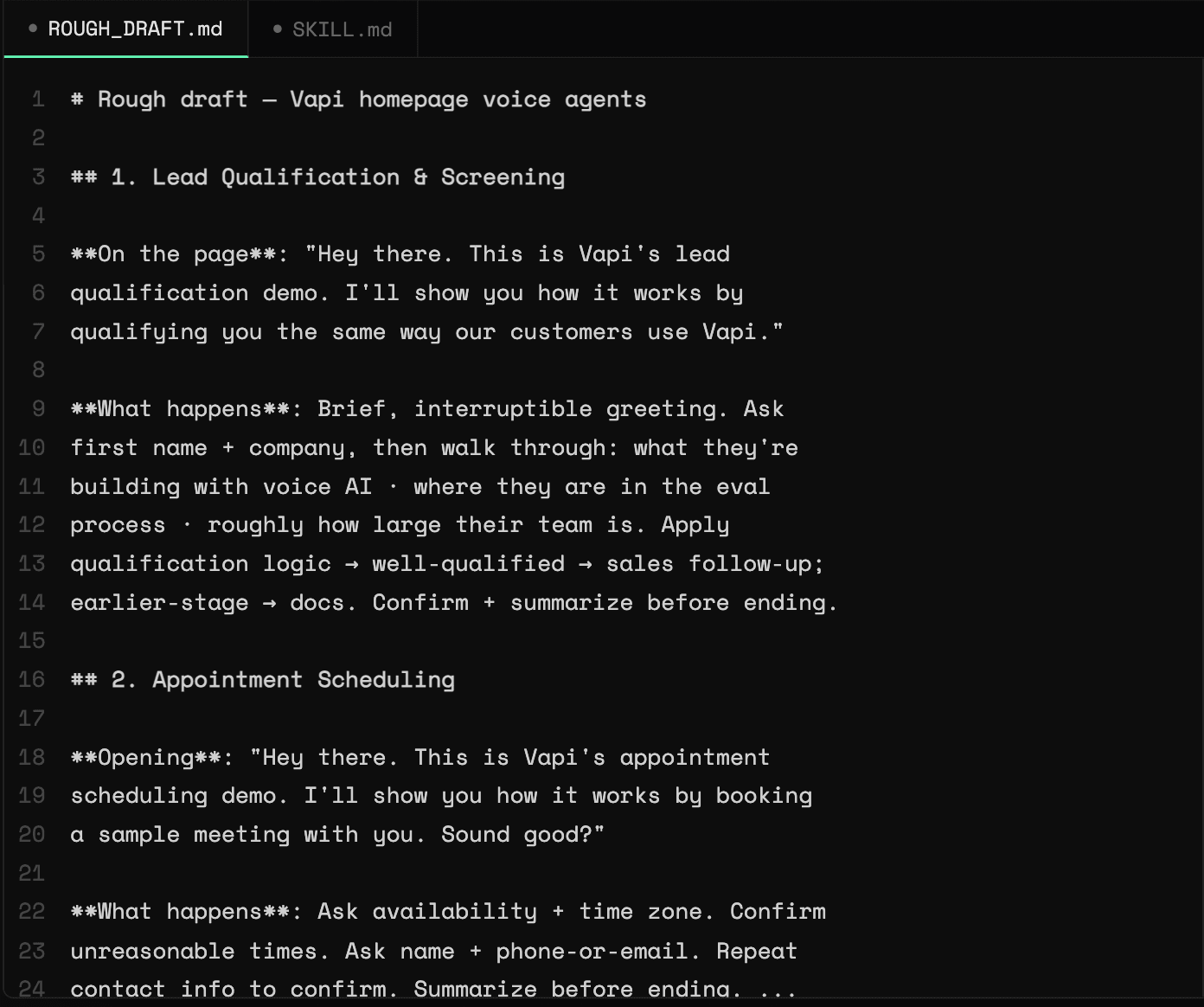
The structure of this draft is important, as it will map deterministically to the configuration:
- Scenario name -> derived snake-case
scenarioId, which becomes the env var that holds the assistant id - Opening line ->
firstMessage - What happens -> body.md
Note: In our homepage agents, we later refined the ID to append
_IDas a suffix. The conventions you choose are up to you.
Phase 2: Bootstrapping
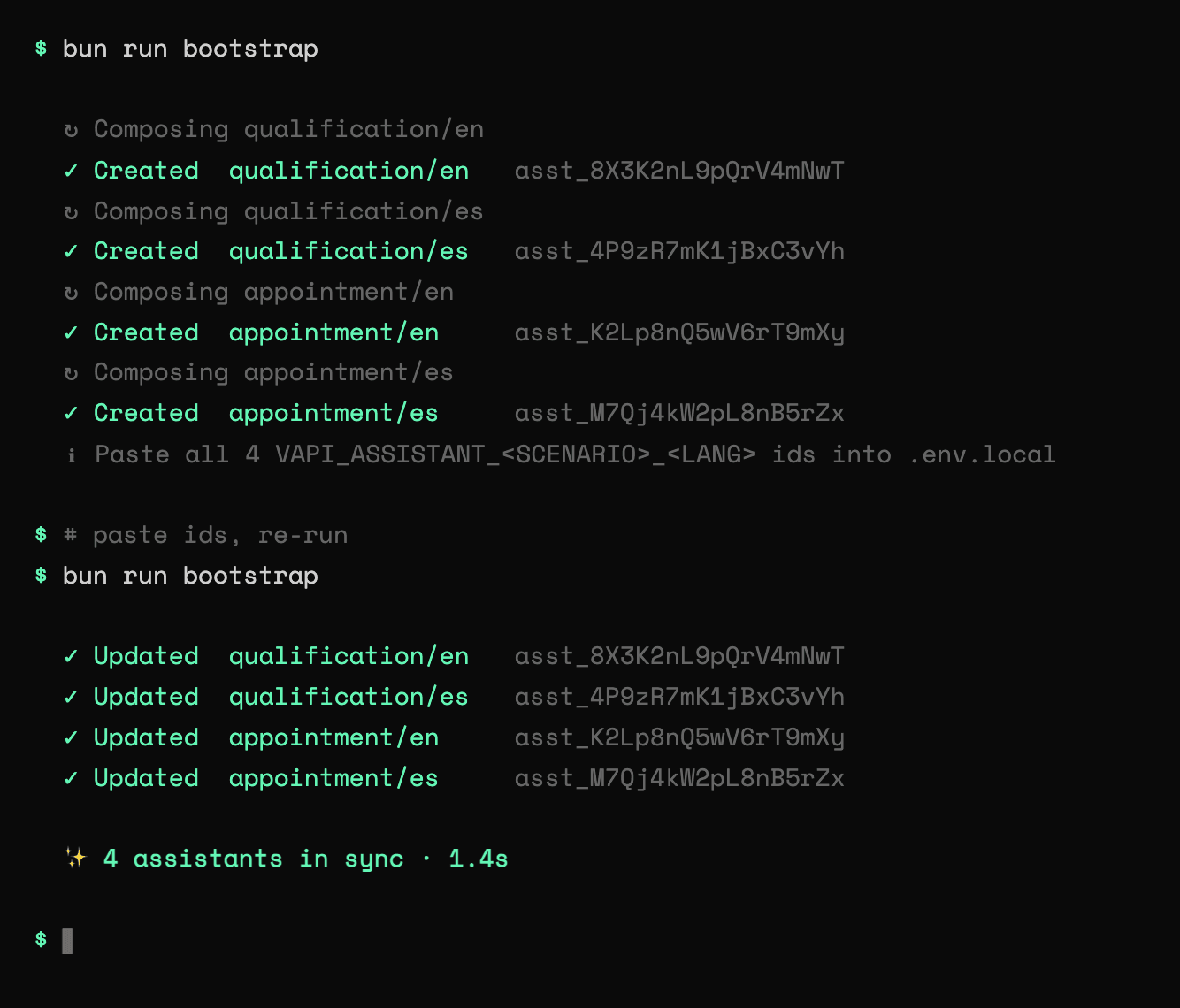
Use the skill pointing at the ROUGH_DRAFT.md, and it will scaffold the whole project, including a small TypeScript spine, which is a per-language voice/transcriber stack, a prompt composer, a scenario registry, an assistant builder, and the bootstrap entry point. Run bun run bootstrap to generate your agent fleet.
What the skill ships as defaults:
- Two languages out of the box,
en+es. Adding a third is one entry in each language record. - Model: OpenAI
gpt-4.1at a flat temperature of 0.5, set once inbuildAssistant.ts. - Voice: ElevenLabs
eleven_turbo_v2(EN) /eleven_multilingual_v2(ES). - Transcriber: Deepgram
nova-3(EN) / Sonioxstt-rt-v4(ES). loadPromptcomposition: onebody.mdper scenario drives every language. EN returns the body unchanged; ES prepends a Spanish preamble with the scenario's localized off-topic redirects spliced in. One wording change tobody.mdre-applies to all variants.- Idempotent upsert loop and env-var-ID state model: for each (scenario x language) tuple, the script reads the assistant's id from an environment variable. Id set runs
assistants.update(id, body); not set runsassistants.create(body)and prints the new id. State lives in.env.local, so reruns are safe, and a stale id (deleted assistant, or a different org after a key rotation) falls back to create on a404. - "Run it twice" verification: the first run creates the fleet and prints the ids to paste into
.env.local; the second run finds them and updates in place instead of duplicating. The skill stops here, as the generatedbody.mdis persona driven and handled in the next phase.
Phase 3: Harden the rough agents
Bootstrapping speeds up development, but the agents are still rough. This phase is the human-in-the-loop phase to refine your agents for production. Here you can:
- Add more languages. The homepage extended
en+esto five languages. - Tune voice and model. Per-scenario temperatures replaced the flat 0.5 (customer-support runs cooler at 0.4; the demo scenarios hotter). EN voices moved to per-scenario overrides with low stability (0.2) for warmth; non-EN sits at 0.5 with a
multifallback plan (OpenAItts-1, then Cartesiasonic-3). The EN transcriber was swapped fromnova-3to Deepgramflux-general-enwith tuned end-of-turn thresholds; non-EN kept Soniox with a Deepgramnova-3fallback. A brand-vocabulary list keeps product names from being misheard. - Persona becomes contract. The rough
body.mdfiles grew hard-constraint, identity/security, and "hard off-topic / chaos handling" sections, plus localizedoff-topic-<lang>.mdredirect lines. This is where guardrails and off-ramps get added. Natural variation comes from the prompt itself via disfluency vocabulary, laughter rules, and banter sections. - Capture tools. Each scenario gained one async client tool.
- Analysis plans. Each scenario ships an
analysisPlanwith asummaryPlan(always summarize in English, whatever language the call was in) and astructuredDataPlanthat extracts a typed JSON record. For example, qualification'sfollow_up_intent_scoreon a 0 to 10 rubric, plus name, company, and use case. - Hooks. Customer-support added an idle hook (
cs_idle_topic_suggest) that fires oncustomer.speech.timeoutafter about 12s and speaks a prompt fromidle-hook.md.
Approaching iteration
Once your agent fleet is live, this framework allows for fast and effective iteration. To make changes, edit the source manually or prompt what changes you want in your favorite coding agent pointed to your repo, then re-run bun run bootstrap. This runs an upsert based on the stored assistant ids, so it will not duplicate your agents. A deleted or stale id will fall back to a fresh create.
Example updates:
- Change what an agent says: edit the
body.mdonce and this reapplies to all agents. - Change one agent's voice or transcriber: edit that language's entry in
languages.ts. - Tweak one scenario's voice: add a
voiceOverrideon the scenario. - Change the model or temperature: update the scenario's model config.
You can also grow the scenarios if you have a new use case after you go live.
- Add a scenario: a
body.md, ascenarios/<id>.ts, and register it in the scenario registry and id types. - Add a language: an id in the types, a voice and transcriber entry in
languages.ts, and a shared language section or preamble. The important thing to remember is to keep the bootstrap as the source of truth. If you make an edit in the dashboard, the next run will overwrite the edits.
Patterns to remember
- Bootstrap as code.
- One body per scenario, layer languages on top of this.
- Language drives your voice/transcriber, and the scenario drives the prompt, tools, and final configuration.
- The skill speeds up the beginning of your dev workflow; you do the final tuning.
- Natural variation is tuned in your prompt.
- Async tools keep calls moving.
- Analysis plans turn into structured data.
Resources and next steps
- Try out the new homepage agents for yourself. Run the new homepage agents
- Ready to build your own? Use the skill to start bootstrapping your own scenarios.
- Visit our docs to learn more about prompting for voice as you tune your agents.
- Join us in the community to share your expertise and connect with other voice agent developers.