Every developer who has shipped a voice agent knows this moment.
You tweak a prompt to make the assistant sound more natural. Maybe you add a new tool. You test a few calls in the playground, everything looks great, and you deploy. A week later, you realize your assistant stopped offering financing on half the relevant calls. Nothing crashed. Nothing alerted. Conversions just quietly dropped.
The problem is not that you made a bad change. The problem is that you had no way to know.
Right now, most teams test assistants the same way: replay a few calls, skim some transcripts, decide it feels good enough. This works fine when your agent is simple. It stops working the moment you have continuous prompt changes, new tools, or model swaps.
The failures that hurt most are the silent ones. Your assistant stops collecting required information. It calls a tool with the wrong arguments. It forgets to mention the 60-month term on financing offers. These regressions only show up days later in metrics or, worse, anecdotal reports from your sales team.
Code has tests. Prompts and tools do not. That is the gap.
Today we are shipping Evals, a way to write tests for your voice agents that run the same way your unit tests do.
The core idea is simple. You define an eval as a JSON conversation that simulates a call. For each important assistant turn, you attach a judge plan that specifies exactly what must happen: the text it should produce, the tool it should call, the arguments it should pass.
Here is what an eval looks like for a service appointment booking flow:
{
  "name": "Book service appointment",
  "name": "Book service appointment",
  "type": "chat.mockConversation",
  "messages": [
    { "role": "user", "content": "I need to service my 2021 Hatchback" },
    {
      "role": "assistant",
      "judgePlan": {
        "model": {
          "provider": "openai",
          "model": "gpt-4o",
          "messages": [
            {
              "role": "system",
              "content": "You are an expert evaluator. You can ONLY return pass or fail and NOTHING else. Look at the assistant message and evaluate it based on the following criteria:\n\nPass criteria: The assistant message should be asking the user for their contact information\n\nFail criteria:  Return fail if the assistant does not do the things mentioned above"
            },
            {
              "role": "user",
              "content": "The assistant message is: {{messages[-1]}}"
            }
          ]
        }
      }
    },
    { "role": "user", "content": "Alex Lee, 555-0134" },
    { "role": "assistant", "content": "What's the current mileage?" },
    { "role": "user", "content": "30,000 miles" },
    {
      "role": "assistant",
      "judgePlan": {
        "judgeType": "exact",
        "toolCalls": [
          {
            "name": "get_current_mileage",
            "arguments": {
              "lastName": "Lee",
              "phoneNumber": "555-0134",
              "currentMileage": "30,000 miles"
            }
          }
        ]
      }
    }
  ]
}
You run this eval locally while iterating on prompts. You wire the same eval into your CI/CD pipeline. If the assistant stops asking for scheduling or fails to call the calendar tool, the build fails before anything hits production.
Evals support three judging strategies, each suited to different kinds of checks.
Exact matching works for deterministic behaviors. Use regex patterns when the assistant must mention specific terms, or JSON matching when a tool call must include particular arguments. You can ignore dynamic fields like timestamps or IDs so your Evals stay stable.
LLM-as-judge handles the fuzzy stuff. Tone, empathy, safety, policy adherence. You write a judging prompt that describes what you expect, and the judge returns a pass or fail. No more hand-writing brittle regexes for subjective behaviors.
Tool call verification tests the full loop. Assert that the assistant calls the right tool with the right arguments. Check that tool responses match expected patterns. Override tool responses and continue the conversation to test downstream behavior even when tools are dynamic.
UnityAI's engineering team has been using Evals to validate LLM logic before running full simulations. They've caught tool calls firing with extra parameters, tools not being called when expected, and prompt contradictions that would have been invisible in manual testing.
The pattern: run Evals first to confirm the LLM is handling logic correctly, then do deeper simulation testing for edge cases. Developers don't want to manually call every time to test prompts. Evals give them a fast check to see if things are working, then they go deeper.
The best Evals come from production issues you have already seen.
When you discover a bad call in your logs, you can turn that transcript into a test. In the dashboard, pull up the call, click the thumbs down button to use it as an eval, specify what the assistant should have done instead, and save. That issue becomes a concrete test that guards against regression forever.
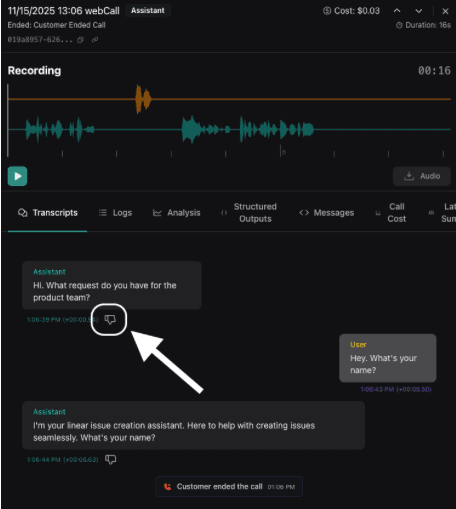
This is the loop that makes agents reliable over time. Every production failure becomes a new constraint that gets checked on every future change. Batch runs and CI/CD Individual Evals are useful. Running multiple Evals makes them powerful.
With batch runs, you can execute multiple Evals at once: all your financing checks, appointment flows, and compliance behaviors. Developers choose which Evals to run for each pipeline, so you can tailor coverage to the changes you’re shipping.
The CLI runs the same Evals you define in the dashboard. Wire it into your pipeline with a single command. The output is machine-readable, so you can plug it into whatever CI system you already use.
You can set up your flow so that if any blocking eval fails, your build stops. Your prompts get the same discipline as your code.
const response = await fetch(`https://api.vapi.ai/eval/run`, {
 method: "POST",
 headers: {
   Authorization: `Bearer ${VAPI_API_KEY}`,
   "Content-Type": "application/json",
 },
 body: JSON.stringify({
   type: "eval",
   // Create an Eval with everything you want to test for in the new assistant
   eval: {
     "type": "chat.mockConversation",
     "messages": [...],
   },
   target: {
     type: "assistant",
     // Pass a transient assistant with the new assistant's settings before publishing it to production
     assistant: {...},
   },
 }),
});


const result = await response.json();
const evalRunId = result.id;
let evalRunCompleted = false;
let evalRunResult;


while (!evalRunCompleted) {
 const evalRun = await fetch(`https://api.vapi.ai/eval/run/${evalRunId}`, {
   method: "GET",
   headers: {
     Authorization: `Bearer ${VAPI_API_KEY}`,
   },
 });
 evalRunResult = await evalRun.json();
 evalRunCompleted = evalRunResult?.status === "completed";
 await new Promise(resolve => setTimeout(resolve, 5000));
}


if(evalRunResult.results[0].status === "pass") {
 console.log("Eval passed");
} else {
 console.log("Eval failed");
}
The developer experience shifts from hope to confidence.
Before: you change a prompt, test it manually, deploy, and wait to see if something breaks.
After: you change a prompt, run your eval suite, see exactly which turns passed or failed, fix the issues, and deploy knowing you have not regressed critical behaviors.
Tech leads get a quick signal before release. QA gets reproducible, versioned tests. Prompt engineers get precise guardrails. Backend engineers get the deterministic checks they expect from the rest of their stack.
Your agents become something you can trust to behave consistently, even as prompts change, tools evolve, and models get swapped.
Evals are available now. You can create them from the Evals page, programmatically via the API, or conveniently via the call logs page.
Start with a handful of critical behaviors: financing offers, appointment booking, required disclosures, transfers to humans. Run them on every change. Expand from there.
Your backend has tests. Your agents should too.