
• Custom Agents
  • Pricing
  • Docs
  • Resources
    Blog
    Product updates and insights from the team
    Video Library
    Demos, walkthroughs, and tutorials
    Community
    Get help and connect with other developers
    Events
    Stay updated on upcoming events.
  • Careers
  • Enterprise
Sign Up
Loading footer...
←BACK TO BLOG /Features... / /Bring Vapi Voice Agents into Your Workflows With The New Vapi MCP Server

Bring Vapi Voice Agents into Your Workflows With The New Vapi MCP Server

Bring Vapi Voice Agents into Your Workflows With The New Vapi MCP Server
Abhishek Sharma • Apr 18, 2025
2 min read
Share
Abhishek Sharma • Apr 18, 20252 min read
0LIKE
Share

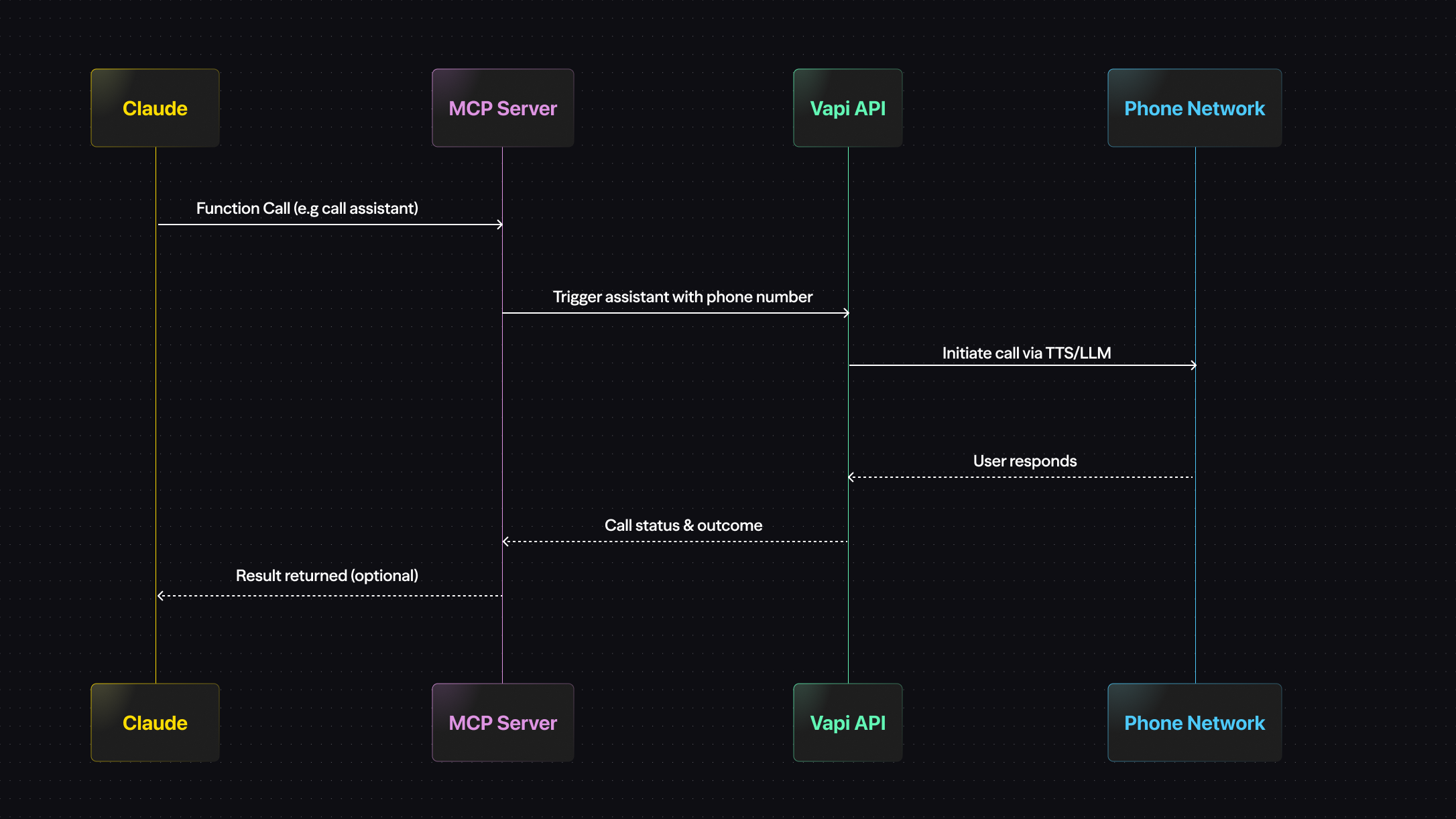
Today, we’re launching the Vapi Model Context Protocol (MCP) Server - a new way to control your voice agents using function calling from any ai agent tool.

With this integration, you can now ask your agent to spin up real-time voice flows, trigger outbound calls, or route to Vapi assistants-without leaving the chat interface. It’s a lightweight but powerful bridge between natural language input and real-world phone infrastructure.

Why It Matters

Bringing LLMs and automation closer together unlocks some serious workflow efficiency. Here’s what you can now do in seconds:

  • Trigger outbound calls directly from Claude desktop
    “Call the customer back with the Riley assistant and confirm delivery for order #3478.”
  • Schedule follow-ups without context switching
    “Book a call with the assistant tomorrow at 2pm using my phone number.”

Instead of jumping between dashboards, SDKs, or cron jobs, you can now use plain language to control live phone flows.

What’s New

The MCP server supports both local and remote setups:

  • Claude Desktop Integration
    Configure Claude to use the Vapi MCP server and trigger voice assistant in real time.

  • Remote Access via SSE
    Connect to https://mcp.vapi.ai/sse to access Vapi functionality from any MCP client - no local server required.

  • Function Calling Support
    Claude Desktop can now pass structured commands directly to Vapi’s API, letting you invoke assistants, transfer calls, and more.

Real-World Examples

Teams are already using the MCP server to power high-leverage workflows:

Healthcare

A nurse uses Claude to say: “Can you use vapi assistant to call the patient to confirm their 10:30am appointment tomorrow?”
The MCP server picks it up, and Vapi routes the call to a scheduling assistant with the right context.

Sales

“Hey Vapi, use the SDR assistant to call Mary on +1234567890. Confirm she received the pricing sheet, ask if she has questions, and offer to schedule a follow-up.”
Claude handles the language, Vapi makes the call.

Support

“Cancel the pizza order, then ask if they want to speak to a human”
The assistant can detect the cancellation and decide to escalate - no custom triage logic required.

Getting Started

  1. Open Claude Desktop → Settings → Developer → Edit Config
  2. Add your Vapi API key and enable the @vapi-ai/mcp-server
  3. Restart Claude Desktop
  4. Create a phone number and assistant in your Vapi Dashboard
  5. Ask Claude to trigger a voice workflow - the server takes care of the rest

You can also run the MCP server locally, or use our hosted SSE endpoint for remote calls.

What’s Next

We see MCP as the connective tissue for a lot more to come:

  • Multi-turn assistant control via Claude
  • Combining tool-calling with Claude’s long-term memory
  • Seamless agent orchestration between chat and voice

For now, this is the first step-and it’s already powerful.

Try it today. Configure your Claude Desktop or Cursor Agent, connect a Vapi assistant, and ask it to make a call. Your workflows just got a voice.

Build your own
voice agent.

sign up
read the docs
Join the newsletter
0LIKE
Share

Table of contents

Join the newsletter
How We Built Vapi's Voice AI Pipeline: Part 1
AUG 21, 2025Features

How We Built Vapi's Voice AI Pipeline: Part 1

Understanding Graphemes and Why They Matter in Voice AI
MAY 23, 2025Agent Building

Understanding Graphemes and Why They Matter in Voice AI

YouTube Earnings: A Comprehensive Guide to Creator Income'
MAY 23, 2025Features

YouTube Earnings: A Comprehensive Guide to Creator Income

Flow-Based Models: A Developer''s Guide to Advanced Voice AI'
MAY 30, 2025Agent Building

Flow-Based Models: A Developer''s Guide to Advanced Voice AI

Free Telephony with Vapi
FEB 25, 2025Agent Building

Free Telephony with Vapi

How We Built Vapi's Voice AI Pipeline: Part 2
SEP 16, 2025Features

How We Built Vapi's Voice AI Pipeline: Part 2

Homograph Disambiguation in Voice AI: Solving Pronunciation Puzzles'
MAY 26, 2025Agent Building

Homograph Disambiguation in Voice AI: Solving Pronunciation Puzzles

Vapi x Deepgram Aura-2  — The Most Natural TTS for Enterprise Voice AI
APR 15, 2025Agent Building

Vapi x Deepgram Aura-2 — The Most Natural TTS for Enterprise Voice AI

AI Wrapper: Simplifying Voice AI Integration For Modern Applications'
MAY 26, 2025Features

AI Wrapper: Simplifying Voice AI Integration For Modern Applications

FastSpeech: Revolutionizing Speech Synthesis with Parallel Processing'
MAY 22, 2025Features

FastSpeech: Revolutionizing Speech Synthesis with Parallel Processing

Tacotron 2 for Developers
MAY 23, 2025Features

Tacotron 2 for Developers

Vapi x LiveKit Turn Detection
MAR 20, 2025Features

Vapi x LiveKit Turn Detection

Claude 4 Models Now Available in Vapi
MAY 23, 2025Features

Claude 4 Models Now Available in Vapi

Real-time STT vs. Offline STT: Key Differences Explained'
JUN 24, 2025Features

Real-time STT vs. Offline STT: Key Differences Explained

Vapi Dashboard 2.0
MAR 17, 2025Company News

Vapi Dashboard 2.0

Vapi AI Prompt Composer '
MAR 18, 2025Features

Vapi AI Prompt Composer

HiFi-GAN Explained: Mastering High-Fidelity Audio in AI Solutions'
MAY 23, 2025Features

HiFi-GAN Explained: Mastering High-Fidelity Audio in AI Solutions

WaveNet Unveiled: Advancements and Applications in Voice AI'
MAY 23, 2025Features

WaveNet Unveiled: Advancements and Applications in Voice AI

Introducing Vapi CLI: The Best Developer Experience for Building Voice AI Agents
JUL 08, 2025Features

Introducing Vapi CLI: The Best Developer Experience for Building Voice AI Agents

Test Suites for Vapi agents
FEB 20, 2025Agent Building

Test Suites for Vapi agents

Mastering SSML: Unlock Advanced Voice AI Customization'
MAY 23, 2025Features

Mastering SSML: Unlock Advanced Voice AI Customization

Now Use Vapi Chat Widget In Vapi
JUL 02, 2025Company News

Now Use Vapi Chat Widget In Vapi

LLMs Benchmark Guide: Complete Evaluation Framework for Voice AI'
MAY 26, 2025Agent Building

LLMs Benchmark Guide: Complete Evaluation Framework for Voice AI

Introducing Vapi Workflows
JUN 05, 2025Agent Building

Introducing Vapi Workflows