
Vapi simulations: test for every type of caller

To help teams ship voice agents they can trust, we're launching Vapi Simulations, a native, AI-powered testing feature. Simulations puts AI testers on the other end of the call, each with a distinct personality and a scenario drawn from your real customers. They hold actual conversations with your agent, and every run comes back with clear pass/fail results, a full transcript, and a recording. With this new feature, you can feel confident in your deployment by validating an agent before it's in production, catching regressions after every change, and knowing it handles edge cases.
Here's why we built it, how it works, and what it changes for you.
Why we built it
Most teams find out their voice agent has a problem from production. A customer complains, or a conversion metric slips, and someone pulls call recordings to figure out what happened. By then, the issue has already cost you brand trust, revenue, and time spent tracking down specific conversational failures. For enterprises, that risk holds back scale. Nobody rolls a voice agent out to their full call volume without a systematic way to prove it works first.
Until now, testing meant placing manual calls, which works for one agent and one change, and stops working the moment you have ten agents and a prompt update shipping every week. There's no easy way to spot a regression aside from calling your own agent and hoping you covered the right paths. Evals are still the right tool for controlled validation, but they run mock conversations with predefined message sequences, and a predefined script can't capture what real callers do. Real callers interrupt. They give you a date in the wrong format, change their mind halfway through, and get frustrated when the agent asks them to repeat themselves.
Simulations closes that gap natively. Build, test, iterate, and monitor in one platform, with the full context of your agents behind every test, against the complexity real callers actually bring.
How it works
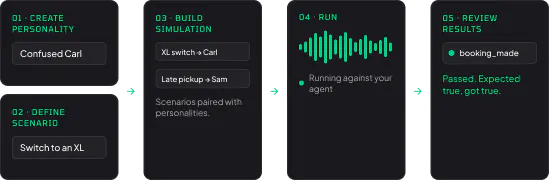
Simulations are built from a few different configurations:
Personalities define who's calling your agent. Each one is a full mock configuration, with its own model, voice, and system prompt. An "impatient customer" who interrupts long responses. A confused first-time caller who needs everything repeated. You design testers around the customer types you actually see, including the ones who might give your agent the hardest time.
Scenarios define what the caller wants and how you measure success. Each scenario pairs tester instructions ("try to book an appointment for a date that isn't available") with evaluations: structured outputs extracted from the conversation and compared against expected values, so every run produces an explainable pass or fail rather than a "sounds good" vibe.
Simulations and suites put them together. A simulation pairs one scenario with one personality; a suite groups related simulations so you can re-run your whole coverage after any change. Runs execute against the assistant or squad you are testing, and you watch results come in live.
Two details make this work for real-world testing. Tool mocks let you simulate API responses at the scenario level, so you can test how your agent handles a calendar API error or a timeout without breaking anything real. And two testing modes let you match cost to purpose: chat mode runs conversations as text for fast, cheap iteration, while voice mode runs the full audio pipeline with recordings for end-to-end validation before you ship.
For teams that want testing in their deployment pipeline, you can create runs through the API, with quality gates that block a deploy when pass rates drop. The quickstart and advanced guide cover setup step by step.
What you can do with it
Validate before launch. An engineer is about to deploy a patient intake agent that should hand off to a nurse when a caller gets frustrated. She runs the frustrated-caller simulation, confirms the agent makes the transfer as intended, and ships knowing that path works.
Catch regressions after changes. A PM updates a lead-qualification prompt to handle a new pricing objection. The simulation suite flags that the agent now skips the eligibility confirmation step. She adjusts the prompt, the test passes, and the change ships without a regression reaching callers.
Prove your guardrails hold. A healthcare compliance team needs confidence that its support agent never references medication dosages or gives clinical advice. They run guardrail-specific simulations against those boundaries and keep the passing runs as a record of exactly what was tested.
Test failure paths you can't produce on demand. An engineer wants to know how her scheduling agent behaves when the calendar API fails. She mocks an error response and discovers the agent tells the caller the appointment was booked. She fixes the error handling and re-runs to confirm before the change goes live.
Get started
Simulations are live in your dashboard. Start in chat mode with a smoke test against an agent you already run, then build out the personalities your customers actually bring. The quickstart will get your first run finished in minutes.
Know your agent works before your customer finds out it doesn't