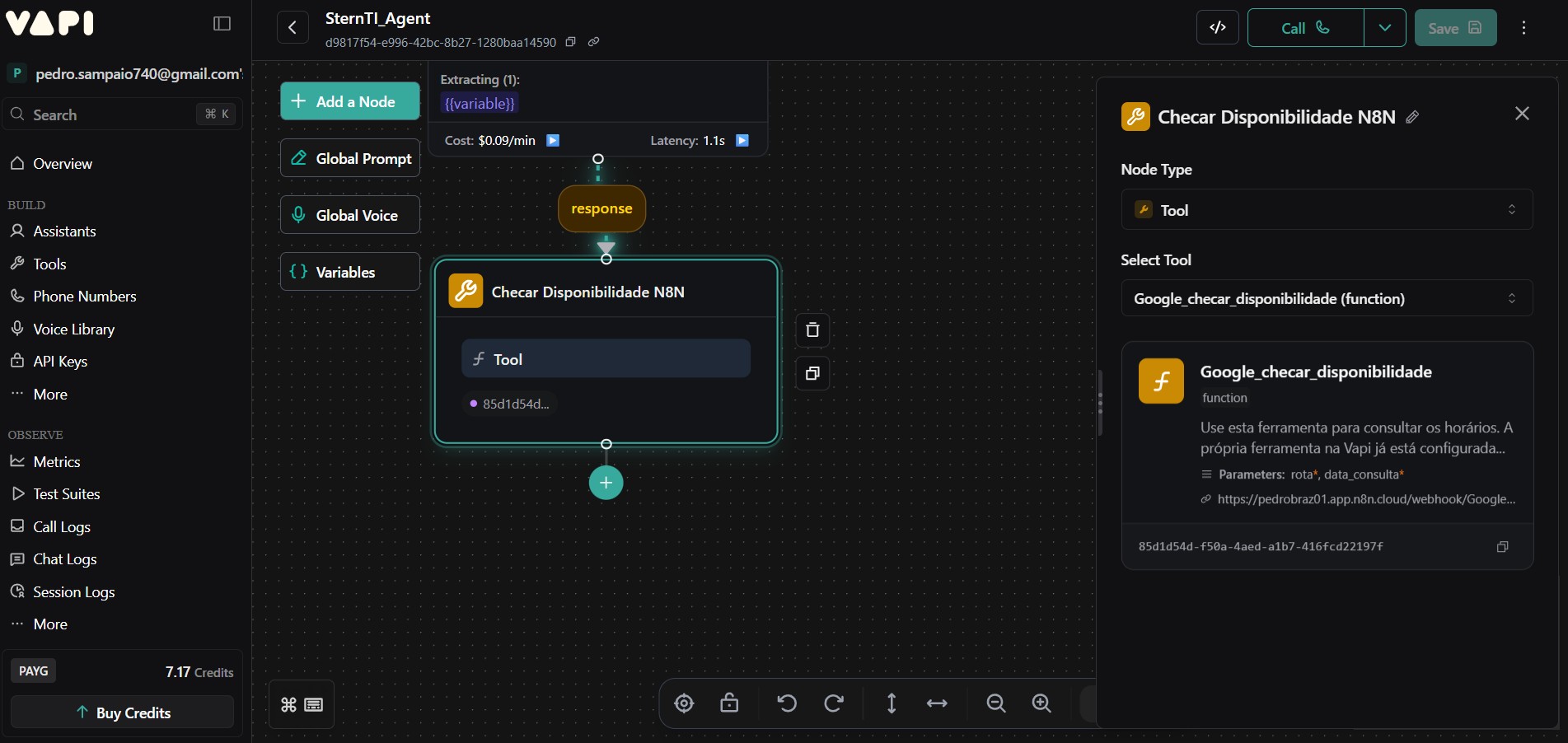
Critical UI Bug: Unable to Edit Tool Parameters in Workflow Node
Hello Vapi Team,
I am facing a critical issue where I am unable to configure the parameters for a Tool node within the Workflow builder.
Problem Description:
I have a configured Tool (e.g., Google_checar_disponibilidade) with parameters (rota, data_consulta).
In the Workflow editor, I add a Tool node.
I select the Google_checar_disponibilidade tool from the "Select Tool" dropdown.
At this point, the UI is supposed to provide a way to map workflow variables to the tool parameters (rota and data_consulta). However, no such interface appears.
There is no gear icon, "edit" button, or parameter fields visible on the tool card inside the node. Clicking the card does nothing. I am completely blocked from configuring the tool's parameters.
What I have tried:
Reloading the page.
Logging out and logging back in.
Deleting and recreating the Tool node multiple times.
This seems to be a UI bug that prevents the parameter mapping interface from appearing. As a result, I cannot pass dynamic data (like a date extracted from the user's utterance) to my n8n backend, making my workflow non-functional.
Could you please investigate this issue with the Workflow UI? The ability to configure tool parameters is critical.
Thank you.
Pedro Sampaio.
My Assistant ID: 056ac9cc-2be8-4704-ae7a-1862ba43f052
My Workflow ID: d9817f54-e996-42bc-8b27-1280baad14590
I am facing a critical issue where I am unable to configure the parameters for a Tool node within the Workflow builder.
Problem Description:
I have a configured Tool (e.g., Google_checar_disponibilidade) with parameters (rota, data_consulta).
In the Workflow editor, I add a Tool node.
I select the Google_checar_disponibilidade tool from the "Select Tool" dropdown.
At this point, the UI is supposed to provide a way to map workflow variables to the tool parameters (rota and data_consulta). However, no such interface appears.
There is no gear icon, "edit" button, or parameter fields visible on the tool card inside the node. Clicking the card does nothing. I am completely blocked from configuring the tool's parameters.
What I have tried:
Reloading the page.
Logging out and logging back in.
Deleting and recreating the Tool node multiple times.
This seems to be a UI bug that prevents the parameter mapping interface from appearing. As a result, I cannot pass dynamic data (like a date extracted from the user's utterance) to my n8n backend, making my workflow non-functional.
Could you please investigate this issue with the Workflow UI? The ability to configure tool parameters is critical.
Thank you.
Pedro Sampaio.
My Assistant ID: 056ac9cc-2be8-4704-ae7a-1862ba43f052
My Workflow ID: d9817f54-e996-42bc-8b27-1280baad14590