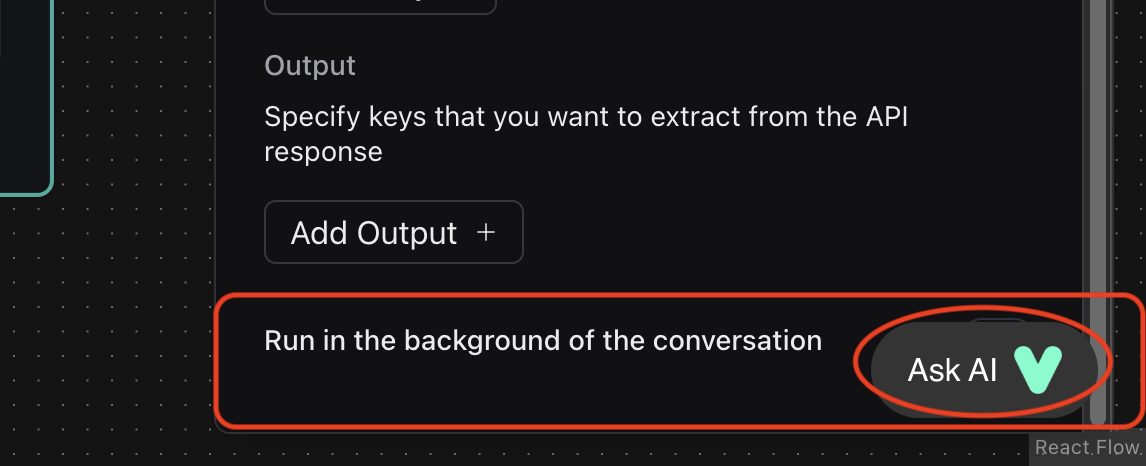
Unable to Toggle "Run in the Background" in API Request Node - UI Bug
Description: In the API Request node, the “Run in the background of the conversation” toggle can’t be switched on/off because the Ask AI icon overlaps the toggle button area. This makes it impossible to toggle the setting, even if I want to.
Impact: This is a minor UI issue but it's frustrating because I can't control this setting as intended.
Steps to reproduce:
1) Open or create a workflow with an API Request node.
2) Scroll to the Body section and add 5-6 values.
3) Scroll to the bottom of the node configuration.
4) Try to toggle the " Run in the background" option.
5) Notice the toggle is unresponsive due to the overlapping Ask AI icon.
Expected Result: The toggle should be fully clickable and not obscured by other UI elements.
Thank you for looking into this issue!
Impact: This is a minor UI issue but it's frustrating because I can't control this setting as intended.
Steps to reproduce:
1) Open or create a workflow with an API Request node.
2) Scroll to the Body section and add 5-6 values.
3) Scroll to the bottom of the node configuration.
4) Try to toggle the " Run in the background" option.
5) Notice the toggle is unresponsive due to the overlapping Ask AI icon.
Expected Result: The toggle should be fully clickable and not obscured by other UI elements.
Thank you for looking into this issue!