foreign-sapphire•3d ago
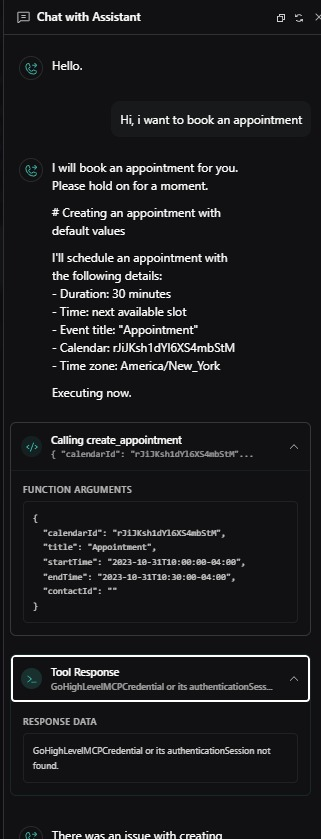
GoHighLevelMCPCredential or its authenticationSession not found
Hello, support team.
While I was integrating vapi to GHL, I faced on this error:
"GoHighLevelMCPCredential or its authenticationSession not found"
I set GHL api key correctly and GHL tools was connected correctly.
I tried to follow your guide, but it didn't work. How can I fix this error? Why this error is occured?
Please guide me step by step.
Thank you.
10 Replies
To resolve the "GoHighLevelMCPCredential or its authenticationSession not found" error, you need to re-authorize your GoHighLevel account in Vapi:
1. Go to your Vapi Dashboard.
2. Navigate to:
For more details, see the GoHighLevel integration guide. Source: - GoHighLevel Integration Documentation
Providers Keys > Tools Provider > GoHighLevel.
3. Click Connect and complete the authorization popup to grant Vapi access.
This step ensures your authentication session is valid and allows Vapi to manage your GoHighLevel contacts and appointments.For more details, see the GoHighLevel integration guide. Source: - GoHighLevel Integration Documentation
⤵️ Mention @Vapi Support Bot for follow-ups 🐥
foreign-sapphireOP•3d ago
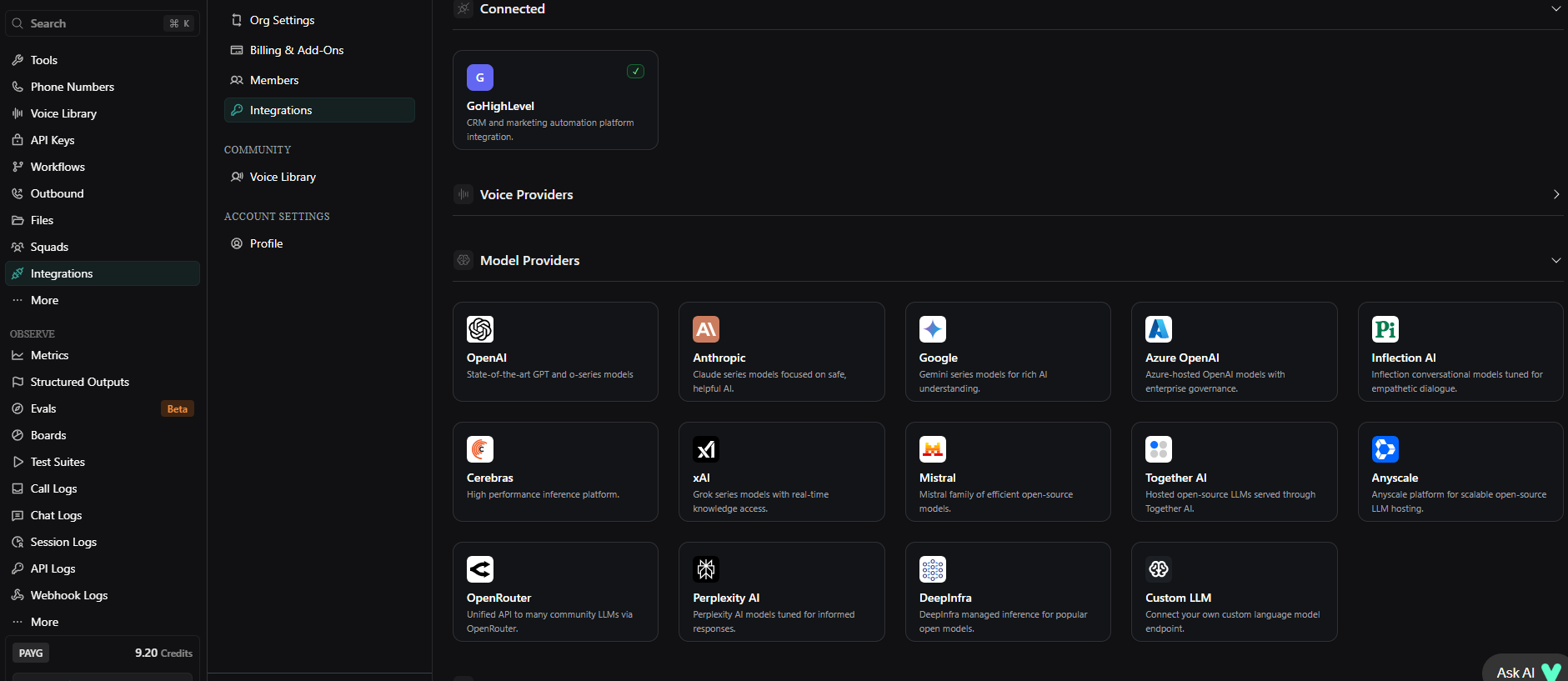
Basically, I cannot find Providers Key section and Tools Provider Section on Vapi Dasiboard. I can see only Integration Section. Anyway, I connected GHL Providers.
Do I have to install MCP? I installed GoHighLevelMCP but i cannot see "coonnected" flag.
Are there any examples of successful integration between GOHIGHLEVEL and VAPI?
vicious-gold•2d ago
Hello,
The error shows VAPI can’t find a valid GoHighLevel MCP credential or session, even though your integration appears connected—this often happens if the session expired or the MCP credential wasn’t saved properly. Have you re-authenticated your GoHighLevel account in VAPI and confirmed the MCP plugin shows “Connected”? Once confirmed, I can guide you step-by-step to fix the issue.
@spider
ambitious-aqua•2d ago
I had the same problem with the tools, and when I resolved it my assistant had another error this time my ghl connection randomly dropped and i cant connect it back, both MCP and API dont work
extended-yellow•2d ago
@Tremix @Vapi This is a known issue; there are multiple open tickets about this for multiple days. This has been going on since at least the 25th of last month since you guys have changed your integration setup.
When do you have it online to get this fixed? You guys keep saying that it can't find it, we can't find it because we can't hook it up. The MCP connection is the whole point. Every time you click it, it doesn't allow a connection and it doesn't show connected. Obviously the credentials don't connect. Multiple people are having this issue
The MCP connection for GoHighLevel is not working or broken. Something you guys did most likely just in the UI/UX. If you claim it's working on the backend, it won't allow you to connect
evident-indigo•2d ago
These guys need to fix this issue! i dont know what the hold up is
Hi there,
Apologies for the delays here. Our team has been actively working on resolving the issue with the GoHighLevel MCP connection in the front-end dashboard. The problem is on our side, and multiple users have been affected, so you’re not doing anything wrong.
While it is technically possible to connect via the API by manually creating a GHL MCP credential, we don’t recommend this approach. It requires completing a separate OAuth authentication flow, and without the dashboard flow working correctly, it’s easy to end up in an invalid or incomplete session.
We’ve nudged the team again and will update you as soon as we hear back with a fix or a timeline.
Thanks for your patience
ambitious-aqua•14h ago
man the seperate ghl to vapi connection with api dosent work too so both options dont work, because the api key in ghl is no longer available since november they removed it for safety issues
foreign-sapphireOP•6h ago
Thanks alot.
evident-indigo•4h ago
Yes please get one this ASAP!