Support Request – VAPI SIP Trunk Issues After Latest Update
After the recent update—where integrations were moved into the Settings section—none of my telephony services are functioning properly. I have a dedicated SIP Trunk configured specifically for VAPI, and I'm currently unable to place any calls.
I've noticed a recurring pattern: every time the system is updated, I have to reconfigure my SIP settings on the platform. Normally, this workaround restores functionality, but today, despite trying multiple reconfiguration methods and formats, I am still unable to receive calls. This directly impacts my assistant’s ability to operate, which in turn affects a major part of my operation that relies heavily on this integration.
I want to highlight that everything was working perfectly yesterday (June 13th), but after today's update, it stopped functioning altogether.
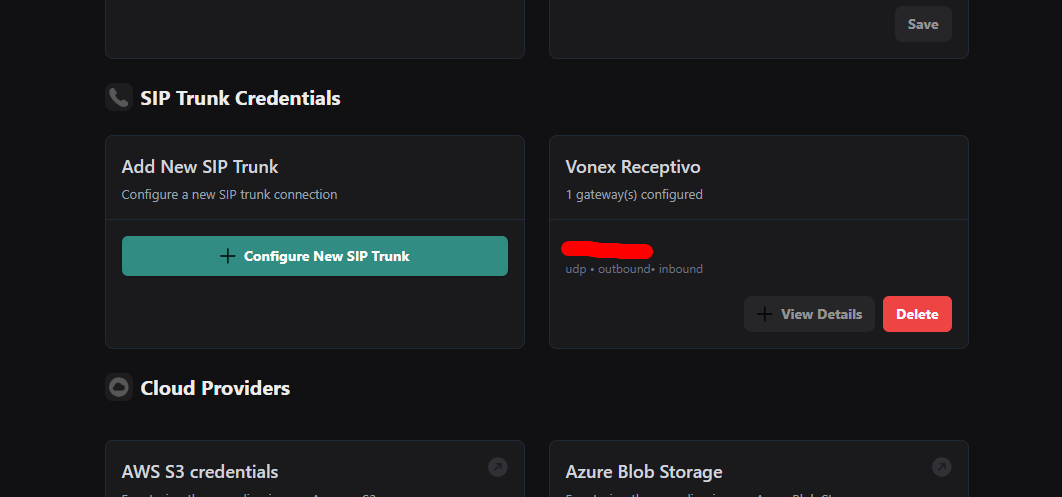
For context, I connect my trunks through:
Integrations > SIP Trunk Credentials.
Additionally, I’ve identified a potential bug:
When I have multiple SIP trunks connected and try to delete one, the system ends up deleting another one instead.
Example:
I have two connected trunks, one named SIP TRUNK #1 and another named SIP TRUNK #2. When I attempt to delete SIP TRUNK #1, the system deletes SIP TRUNK #2 instead. I’m unsure why this is happening.
I kindly request your support in resolving these issues as soon as possible, given the critical impact on my operations.
I've noticed a recurring pattern: every time the system is updated, I have to reconfigure my SIP settings on the platform. Normally, this workaround restores functionality, but today, despite trying multiple reconfiguration methods and formats, I am still unable to receive calls. This directly impacts my assistant’s ability to operate, which in turn affects a major part of my operation that relies heavily on this integration.
I want to highlight that everything was working perfectly yesterday (June 13th), but after today's update, it stopped functioning altogether.
For context, I connect my trunks through:
Integrations > SIP Trunk Credentials.
Additionally, I’ve identified a potential bug:
When I have multiple SIP trunks connected and try to delete one, the system ends up deleting another one instead.
Example:
I have two connected trunks, one named SIP TRUNK #1 and another named SIP TRUNK #2. When I attempt to delete SIP TRUNK #1, the system deletes SIP TRUNK #2 instead. I’m unsure why this is happening.
I kindly request your support in resolving these issues as soon as possible, given the critical impact on my operations.